请注意,本文编写于 957 天前,最后修改于 957 天前,其中某些信息可能已经过时。
目录
使用到的frp项目gti仓库:https://github.com/snowdreamtech/frp
使用阿里云ECS服务器 Ubuntu系统
参考教程:https://blog.csdn.net/xuzhongyi103/article/details/134363523
免费的安全证书申请:https://ohttps.com/guide/createcertificate
相关配置文件
frps.toml配置:
bindPort = 绑定的端口号
vhostHTTPPort = http访问的端口号
frpc.toml配置:
serverAddr = "阿里云服务器ip"
serverPort = 上面写的绑定的端口号

[[proxies]]
name = "pal"
type = "udp"
localIP = "这是一个幻兽帕鲁服务器的本地ip"
localPort = 8211
remotePort = 8211

[[proxies]]
name = "home"
type = "http"
localIP = "http请求的本地ip"
localPort = 上面写的http访问的端口号
customDomains = ["www.voidcloud.online"]
nginx.conf配置 (添加到nginx中的http项中)
server {
  listen 80;
  listen 443 ssl http2;
  ssl_certificate /cert/nginx/fullchain.cer;
  ssl_certificate_key /cert/nginx/cert.key;
  server_name *.voidcloud.online;                                  #自己的域名
  proxy_connect_timeout 180;
  proxy_send_timeout 180;
  proxy_read_timeout 180;
  proxy_set_header Host $host;
  proxy_set_header X-Forwarder-For $remote_addr;
  proxy_set_header Upgrade $http_upgrade;
  proxy_set_header Connection "Upgrade";
  location / {
      proxy_pass http://127.0.0.1:xxxx;                      #填入Frps.ini中vhost_http_port端口号
  }
服务端
将frps.toml放到阿里云服务器中,并创建frps的服务:
安装systemd,通常情况下系统都带得有,没有的情况下使用如下命令安装。
# 使用 yum 安装 systemd(CentOS/RHEL)
yum install systemd

# 使用 apt 安装 systemd(Debian/Ubuntu)
apt install systemd
创建frps.service服务
# 创建并编辑该文件
sudo vim /etc/systemd/system/frps.service
写入内容
[Unit]
# 服务名称,可自定义
Description = frp server
After = network.target syslog.target
Wants = network.target

[Service]
Type = simple
# 启动命令,改为实际存放frps的路径
ExecStart = /path/to/frps -c /path/to/frps.toml

[Install]
WantedBy = multi-user.target
以服务的方式管理frps
# 启动frp
sudo systemctl start frps
# 停止frp
sudo systemctl stop frps
# 重启frp
sudo systemctl restart frps
# 查看frp状态
sudo systemctl status frps
# 设置为开机自启
sudo systemctl enable frps
客户端
客户端使用的是极空间的NAS
通过Docker下载镜像 snowdreamtech/frpc
并创建容器,添加文件路径映射
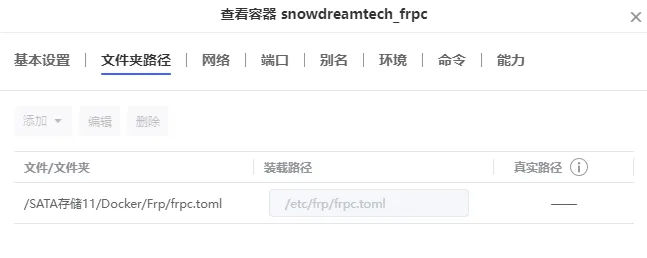
网络选择为host
命令中 EntryPoint 改为自定义:
'/bin/sh' '-c' '/usr/bin/frpc -c /etc/frp/frpc.toml'
应用后在映射目录配置frpc.toml配置文件
Nginx配置
为了能让外网使用https访问http,直接通过Nginx将https请求转发到http。
在阿里云服务器安装Nginx并修改 nginx.conf 配置文件。
需求拥有 https证书,可以通过顶部提供的网址申请免费证书
本文作者:Void
本文链接:
版权声明:本博客所有文章除特别声明外,均采用 BY-NC-SA 许可协议。转载请注明出处!
目录